The graph orchestrator
SelectStar's orchestrator is a graph with conditional edges and shared state, not a flat ReAct loop. This is the most common question we get — "wait, no Python, no LangGraph?" Here's the honest, detailed answer.
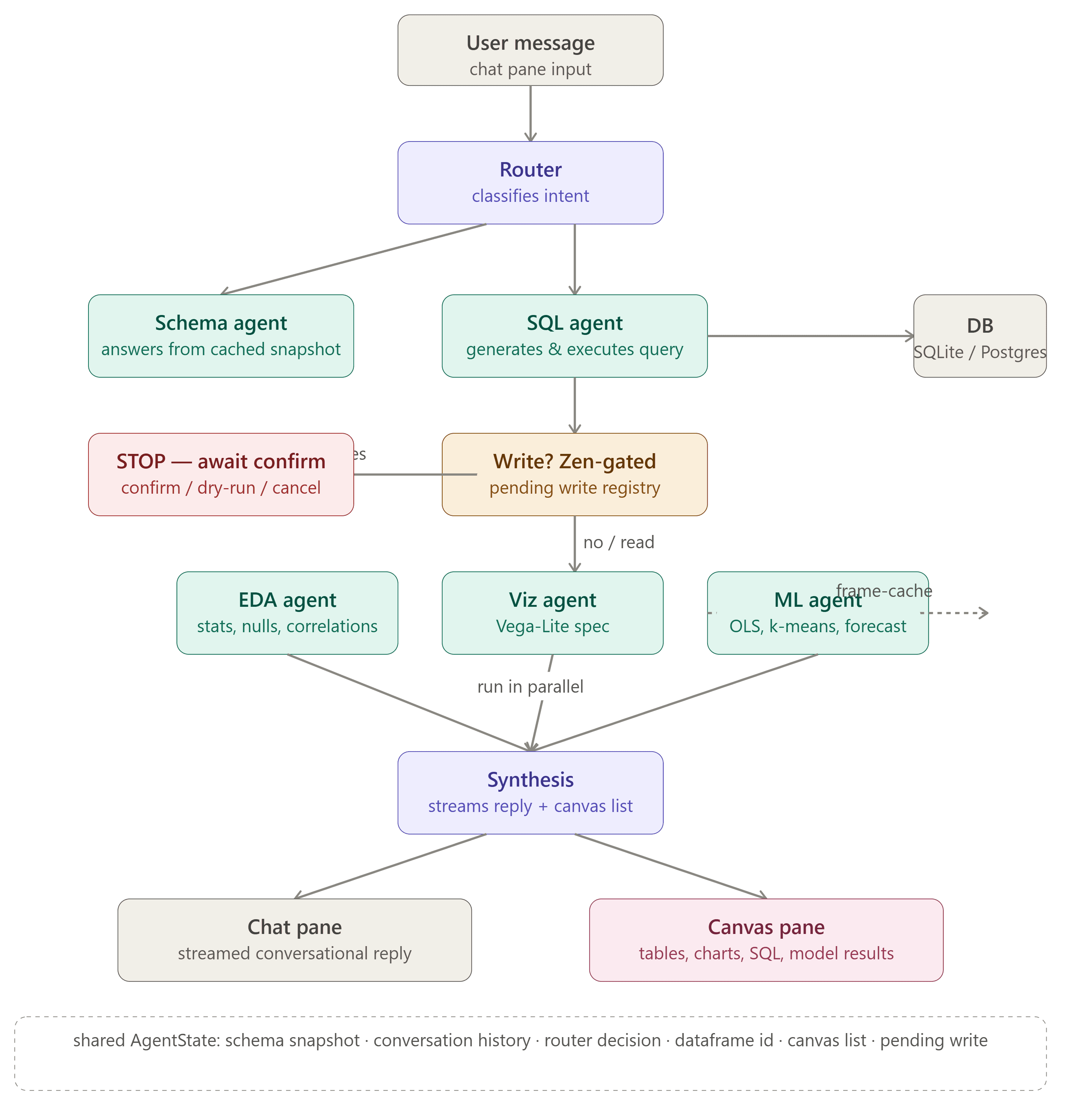
AgentState flows through conditional edges. EDA, Viz, and ML run in parallel after a SELECT (fork-join).Every concept has a TypeScript-native equivalent
The original spec called for Python 3.11 + FastAPI + LangGraph + SQLAlchemy + pandas/scikit-learn. That's an excellent stack. But this project runs in a Next.js 16 + TypeScript environment, so we adapted every concept to its TypeScript-native equivalent — without losing any of the architectural ideas.
The orchestrator is a graph, not a loop
LangGraph's value is modeling the flow as a graph with conditional edges and shared state, not a flat ReAct "think → call tool → repeat" loop. We replicate that exactly. Shared state flows through this graph as a single typed AgentStateobject — the conversation history, cached schema snapshot, the router's decision, the most recent query result (by id), the canvas objects produced this turn, any pending write awaiting confirmation, and the final reply.
The orchestrator (runTurn) implements the conditional edges: the Router classifies intent first. If it routes to Schema, that node answers from the cached snapshot. If it routes to SQL, that node generates and executes a single query — and if Zen mode is on and the statement is a write, it stops the graph and awaits user confirmation (the write is registered as pending, never auto-executed). After a successful SELECT, the EDA / Viz / ML nodes run in parallel. Finally, Synthesis — the only node that writes user-facing prose — streams the reply token-by-token.
The six agents
Shared AgentState
Every agent reads from and writes to a single typed state object. This is the LangGraph "shared state" pattern, in TypeScript. The state includes the conversation history, the cached schema snapshot, the router's decision, the most recent query result (by id, never the full rows), the canvas objects produced this turn, any pending write awaiting confirmation, and the final reply.
interface AgentState {
  // Shared context
  sessionId: string;
  history: Message[];
  schema: SchemaSnapshot;          // cached at connection time

  // Per-turn state
  routerDecision: RouterDecision;  // intent + which agents to run
  queryResult?: { frameId: string; rowCount: number; ms: number };
  canvasObjects: CanvasObject[];   // tables, charts, SQL, ML, etc.

  // Zen mode — pending write
  pendingWrite?: { pendingId: string; sql: string; impact: string };

  // Final reply (streamed by Synthesis)
  reply: string;
}

// CanvasObject is a discriminated union — typed artifacts
type CanvasObject =
  | { kind: "table"; frameId: string; columns: Column[]; rows: Row[] }
  | { kind: "chart"; spec: VegaLiteSpec }
  | { kind: "sql"; sql: string; rowCount?: number; ms?: number }
  | { kind: "eda"; profile: StatisticalProfile }
  | { kind: "model"; metrics: ModelMetrics; predictions: Row[] }
  | { kind: "pending-write"; pendingId: string; sql: string; impact: string }
  | { kind: "error"; message: string };
Why a graph beats a loop for databases
Most AI agents run in a ReAct loop (Reasoning + Acting). The LLM is given a list of tools and left to repeatedly output Thought → Tool Call → Observation until it decides it is finished. While flexible, this approach is notoriously unreliable for database and BI operations.
✕ ReAct loop problems
- • LLM gets confused by a database error → queries repeatedly, hallucinates, or loops
- • Hard to guarantee no destructive DROP/DELETE, even with strict prompts
- • Sequential execution — EDA, Viz, ML run one after another
- • Full history passed every step — high token cost
✓ Graph orchestrator
- • Deterministic edges — Router classifies intent up front
- • Write safety hard-coded at the graph edge (Zen mode)
- • Fork-join: EDA, Viz, ML run in parallel after a SELECT
- • Per-agent scoped context — small focused prompts
Extending the graph
Because the graph is implemented in standard TypeScript, you can add new analytical nodes (e.g. PDF exporter, anomaly detector) by defining a new node and updating the conditional routing logic in runTurn().
// 1. Create src/lib/agents/your-agent.ts
export async function runYourAgent(state: AgentState): Promise<Partial<AgentState>> {
  // your logic here
  return {
    canvasObjects: [...state.canvasObjects, yourArtifact],
  };
}

// 2. Add the agent name to AgentName in src/lib/types.ts
type AgentName = "router" | "schema" | "sql" | "eda" | "viz" | "ml"
               | "synthesis" | "your-agent";  // ← add here

// 3. Add a routing rule in src/lib/agents/router.ts' system prompt
//    so the Router knows when to pick your agent

// 4. Add a node in src/lib/agents/orchestrator.ts' runTurn()
if (decision.agents.includes("your-agent")) {
  const result = await runYourAgent(state);
  Object.assign(state, result);
}

// 5. (Optional) Add a canvas-object type + renderer for structured output
Next steps
Read the API reference to see how the orchestrator is exposed over HTTP, or browse every agent in the features page.